Trade Editor
The Trade Editor allows you to configure villager trades for your custom items.
Accessing
- Open the item editor:
/edit gui <itemId> - Click the Trades button (emerald icon)
- The Trade Editor GUI opens
Interface
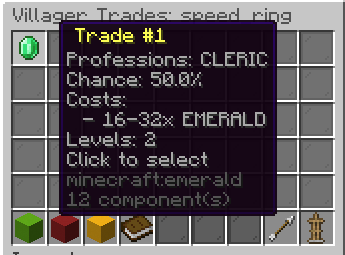
Each configured trade is displayed showing:
- Professions that offer the trade
- Trade chance (0%–100%)
- Required levels
- Cost items with amounts
Adding a Trade
- Click Add Trade
- Set each property via chat:
- Professions: Type profession names (e.g.,
CLERIC, LIBRARIAN) orALL - Chance: Type a decimal (e.g.,
0.3for 30%) - Trade Levels: Type levels (e.g.,
3, 4, 5) - Cost Items: Set material and amount ranges for each cost
- Professions: Type profession names (e.g.,
Cost Items
Each trade can have up to 2 cost items:
| Slot | Required | Description |
|---|---|---|
| Primary | ✅ | Main cost (usually emeralds) |
| Secondary | ❌ | Additional cost (optional) |
For each cost item, configure:
- Material (e.g.,
EMERALD) - Min amount and Max amount
The actual cost is randomized within the range for each villager instance.
Editing a Trade
- Click on an existing trade
- Select the property to modify
- Enter the new value in chat
Removing a Trade
- Click on an existing trade
- Select Remove
Validation
- At least one profession must be specified
- Chance must be between 0.0 and 1.0
- At least one cost item is required
- Cost amounts must be positive