Recipe Editor
The Recipe Editor provides an in-game interface for creating crafting recipes for custom items.
Accessing
- Open the item editor:
/edit gui <itemId> - Click the Recipes button (crafting table icon)
- The Recipe Editor GUI opens
Supported Recipe Types
| Type | Description |
|---|---|
| Shaped | 3×3 grid with defined pattern |
| Shapeless | Any ingredient arrangement |
| Furnace | Smelting recipe |
| Anvil | Combining two items |
| Smithing | Smithing table upgrade |
Creating a Shaped Recipe
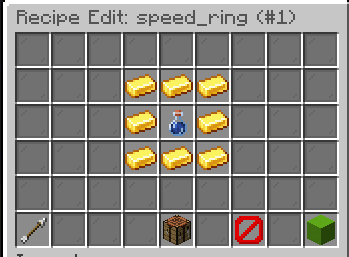
- Click Add Recipe → Shaped
- A 3×3 crafting grid appears in the GUI
- Place items into the grid slots to define the pattern
- The result (your custom item) is shown in the output slot
- Click Save to register the recipe
Creating a Shapeless Recipe
- Click Add Recipe → Shapeless
- Place items into the ingredient slots (any order)
- Click Save to register
Creating a Furnace Recipe
- Click Add Recipe → Furnace
- Set the input item via the GUI or chat
- Configure cooking time (ticks) and experience via chat
- Click Save
Creating an Anvil Recipe
- Click Add Recipe → Anvil
- Set the left and right input items
- Click Save
Creating a Smithing Recipe
- Click Add Recipe → Smithing
- Set the base item, addition item, and template item
- Click Save
Managing Recipes
- Edit: Click on an existing recipe to modify it
- Delete: Click the delete button next to a recipe
- Multiple recipes: Items can have multiple recipes of different types
Custom Item Ingredients
You can use other CuriosPaper custom items as recipe ingredients. They are identified by their item ID and PDC tag.