Ability Editor
The Ability Editor allows you to visually add, modify, and remove abilities from custom items.
Accessing
- Open the item editor:
/edit gui <itemId> - Click the Abilities button (potion bottle icon)
- The Ability Editor GUI opens
Interface
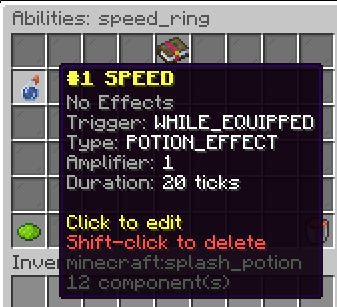
The Ability Editor displays each configured ability as an item in the GUI. Each ability shows:
- Trigger type (EQUIP, DE_EQUIP, WHILE_EQUIPPED)
- Effect type (POTION_EFFECT or PLAYER_MODIFIER)
- Effect name (e.g., SPEED, GENERIC_MAX_HEALTH)
- Amplifier and duration
Adding an Ability
- Click the Add Ability button
- Set each property via chat input when prompted:
- Trigger: Type
equip,de_equip, orwhile_equipped - Effect Type: Type
potionormodifier - Effect Name: Type the effect/attribute name (e.g.,
SPEED) - Amplifier: Type a number (0–9)
- Duration: Type duration in ticks (20 ticks = 1 second)
- Trigger: Type
Editing an Ability
- Click on an existing ability in the GUI
- Select which property to modify
- Enter the new value in chat
Removing an Ability
- Click on an existing ability
- Select the Remove option
Validation
The editor validates abilities before saving:
- Effect name must be a valid PotionEffectType or Attribute
- Amplifier must be between 0 and 9
- Trigger must not be null
Invalid configurations are rejected with an error message in chat.