GUI Overview
CuriosPaper uses a two-tier GUI system for the accessory inventory.
Tier 1: Main Menu
Opened with /baubles (or /b, /bbag), the main menu shows all configured slot types in a 54-slot (double chest) inventory.
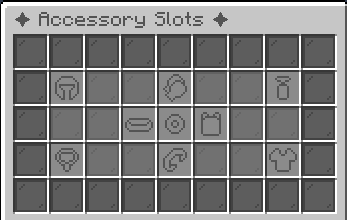
Layout
- Each slot type is displayed as an icon item with its configured name and lore
- A decorative filler pattern surrounds the slot icons
- Clicking a slot type icon opens the Tier 2 view for that category
Customization
The main menu appearance is controlled in config.yml:
gui:
  main-title: "&8✦ Accessory Slots ✦"
  main-gui-size: 54
  filler-material: "GRAY_STAINED_GLASS_PANE"
  border-material: "BLACK_STAINED_GLASS_PANE"
  filler-name: "&r"
  use-patterns: true
Tier 2: Slot Inventory
Clicking a slot type in the main menu opens the Slot Inventory, which shows the actual accessory slots for that category.
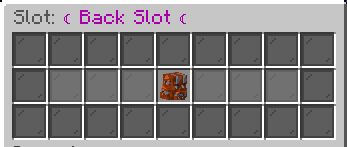
Features
- Displays the configured number of slots for that type (e.g., 2 for rings, 4 for charms)
- Empty slots show a placeholder icon if
show-empty-slotsis enabled - Players can click to place or click to remove accessories
- Slot validation ensures only correctly tagged items can be placed
Interaction
| Action | Result |
|---|---|
| Click empty slot with tagged item on cursor | Equip the accessory |
| Click equipped accessory | Unequip (return to cursor) |
| Click equipped accessory with different tagged item | Swap accessories |
Sound Effects
The GUI can play sounds for various actions: