Your First Accessory
This guide walks you through creating your first custom accessory item using the in-game editor.
Prerequisites
- CuriosPaper installed and running
- Operator permissions (or
curiospaper.editpermission) - The
item-editorfeature enabled inconfig.yml(enabled by default)
Step 1: Create the Item
Run the following command:
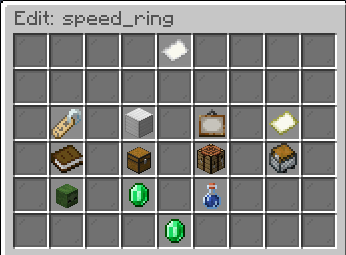
This creates a new custom item with the ID speed_ring and opens the Edit GUI.
Step 2: Configure the Item
In the Edit GUI, you can set:
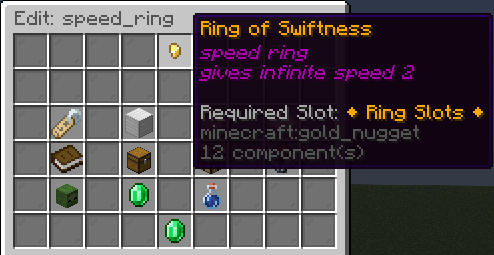
- Display Name — Click the name tag to set a custom name (e.g.,
&6Ring of Swiftness) - Material — Click the material slot to change the base item (e.g.,
GOLD_NUGGET) - Slot Type — Click the slot type button and select
ring - Lore — Add description lines
- Custom Model Data — Set an integer for custom textures (optional)
Step 3: Add an Ability
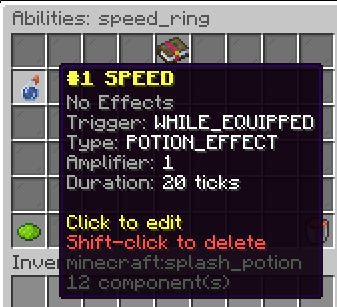
- In the Edit GUI, click the Abilities button (potion icon)
- This opens the Ability Editor
- Set the following:
- Trigger:
WHILE_EQUIPPED - Effect Type:
POTION_EFFECT - Effect Name:
SPEED - Amplifier:
0(Speed I) - Duration:
100(5 seconds, refreshes continuously)
- Trigger:
Step 4: Add a Recipe
- In the Edit GUI, click the Recipes button
- This opens the Recipe Editor
- Choose Shaped recipe type
- Arrange ingredients in the 3×3 grid:
Step 5: Test It
- Craft the item using the recipe you defined
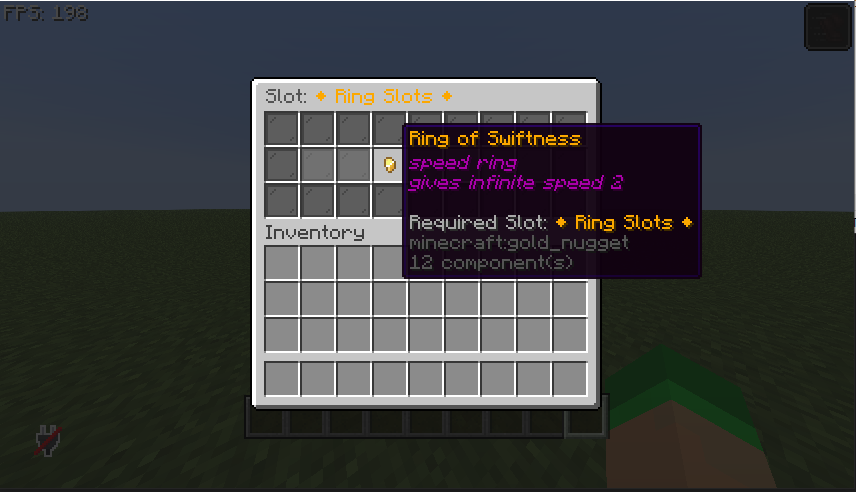
- Open the accessory GUI with
/baubles - Click on the Ring Slots category
- Place your
Ring of Swiftnessinto an empty ring slot - You should receive the Speed I effect!
Step 6: Give the Item
You can also give the item directly:
Congratulations!
You've created your first custom accessory with an ability and a recipe. Explore the Systems section to learn about all the features available.