GUI Editors
CuriosPaper provides in-game visual editors for creating and configuring custom items. These editors are accessible through the /edit command.
Sections
| Page | Description |
|---|---|
| Ability Editor | Configure potion effects and attribute modifiers |
| Recipe Editor | Create shaped, shapeless, furnace, anvil, and smithing recipes |
| Mob Drop Editor | Configure mob drops with entity types and chances |
| Trade Editor | Set up villager trades with professions and costs |
Accessing the Editor
/edit create <itemId>   — Create a new item and open the editor
/edit gui <itemId>      — Open the editor for an existing item
Permission required: curiospaper.edit
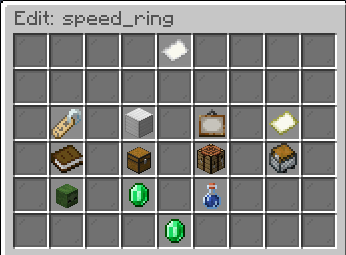
Main Edit GUI
The main Edit GUI displays the current item configuration with clickable buttons to modify each property:
| Button | Function |
|---|---|
| Name Tag | Set display name |
| Material Slot | Change base material |
| Slot Type | Assign accessory slot |
| Lore | Edit description lines |
| Model Data | Set custom model data / item model |
| Abilities | Open the Ability Editor |
| Recipes | Open the Recipe Editor |
| Mob Drops | Open the Mob Drop Editor |
| Trades | Open the Trade Editor |
Chat Input
Most editors use a chat-based input system. When prompted, type your value in chat. The ChatInputManager handles capturing and processing these inputs.